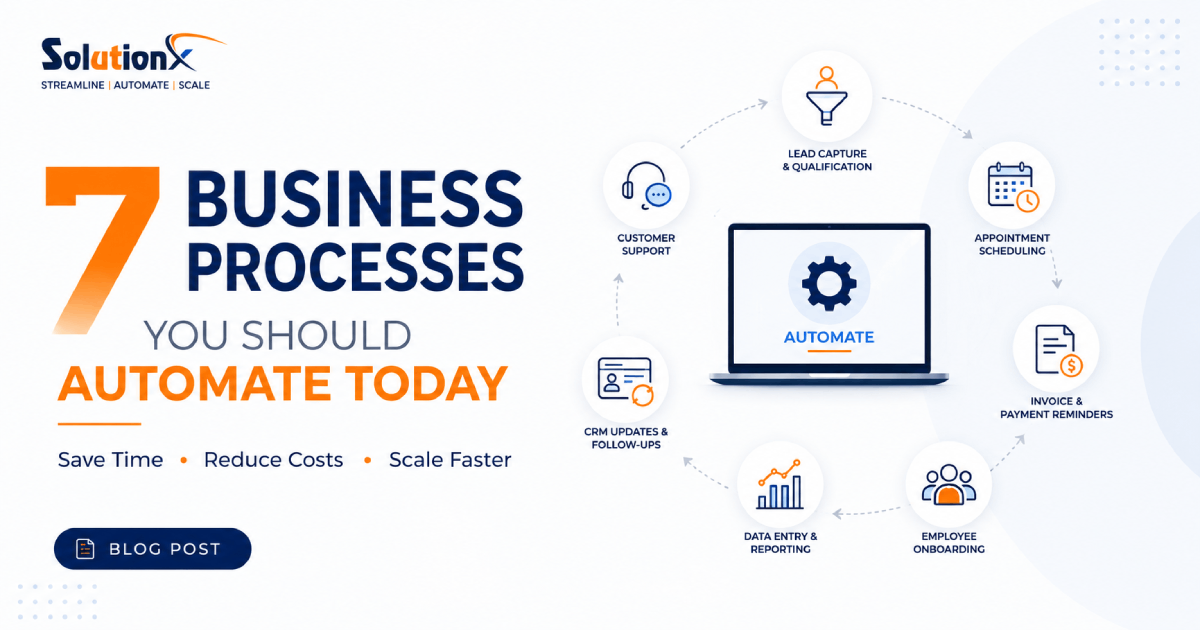
7 Business Processes You Should Automate Today
Businesses today face increasing pressure to do more with fewer resources. Teams are expected to respond faster, deliver better customer experiences, and operate more efficiently than ever before. Yet many organizations still spend countless hours on repetitive, manual tasks that add little strategic value.
Business process automation helps solve this challenge by replacing repetitive work with automated workflows, reducing errors, improving consistency, and freeing employees to focus on higher-value activities.
The good news is that you don't need to automate everything at once. In most cases, a few targeted automations can save dozens of hours every month while improving operational efficiency across your organization.
In this article, we'll explore seven business processes that every company should consider automating today.
Why Business Process Automation Matters
Business process automation (BPA) uses technology to execute recurring tasks and workflows without constant human intervention. Automation can be applied across departments including sales, marketing, customer support, finance, operations, and human resources.
The benefits are significant:
Reduce manual workload
Improve productivity
Minimize human errors
Accelerate response times
Enhance customer experiences
Lower operational costs
Increase scalability
Organizations that automate routine processes can focus their time and resources on innovation, growth, and customer satisfaction rather than repetitive administrative tasks.
1. Lead Capture and Qualification
Generating leads is only the first step. Many businesses lose opportunities because leads are not followed up quickly or are manually entered into multiple systems.
Automating lead capture ensures that every inquiry is immediately recorded, organized, and routed to the right team.
What Can Be Automated?
Website contact forms
Lead assignment
CRM record creation
Lead scoring
Follow-up emails
Meeting scheduling
Example
A visitor submits a contact form on your website.
Instead of manually checking emails and entering information into a CRM, an automated workflow can:
Create a CRM record.
Send a confirmation email.
Assign the lead to a sales representative.
Schedule a follow-up task.
Notify the appropriate team member.
This process happens instantly, ensuring faster response times and better conversion rates.
2. Customer Support Requests
Customer support teams often spend a significant portion of their day answering repetitive questions and manually routing tickets.
Automation can dramatically improve both customer satisfaction and operational efficiency.
What Can Be Automated?
Ticket creation
Ticket routing
FAQ responses
Status updates
Escalation workflows
Customer notifications
Example
When a customer submits a support request:
The system automatically categorizes the issue.
Assigns it to the appropriate department.
Sends a confirmation email.
Tracks response times.
Escalates unresolved issues automatically.
This reduces delays and ensures customers receive timely assistance.
3. Appointment Scheduling
Scheduling meetings manually can be surprisingly time-consuming. Back-and-forth emails often create unnecessary delays and frustration.
Automated scheduling tools eliminate this friction by allowing clients and prospects to book appointments based on real-time availability.
What Can Be Automated?
Calendar synchronization
Appointment booking
Reminder notifications
Rescheduling requests
Meeting confirmations
Example
A potential client clicks "Book a Free Consultation" on your website.
The system automatically:
Displays available time slots.
Creates the calendar event.
Sends confirmations.
Issues reminder notifications.
Updates team calendars.
The entire scheduling process becomes effortless for both parties.
4. Invoice and Payment Reminders
Late payments can negatively impact cash flow and create administrative headaches.
Automation helps businesses maintain consistent payment collection without manually following up with every client.
What Can Be Automated?
Invoice generation
Payment reminders
Overdue notices
Recurring billing
Payment confirmations
Example
After a project milestone is completed:
An invoice is automatically generated.
Payment reminders are sent before due dates.
Overdue notifications are triggered when necessary.
Payment confirmation emails are delivered automatically.
This reduces manual effort while improving financial management.
5. Employee Onboarding
Onboarding new employees involves multiple departments, documents, and repetitive administrative tasks.
Automating onboarding ensures consistency while creating a smoother experience for new team members.
What Can Be Automated?
Welcome emails
Document collection
Training assignments
Access provisioning
Equipment requests
HR checklists
Example
When a new employee is added to the HR system:
Welcome emails are sent automatically.
Training materials are assigned.
IT receives equipment requests.
System accounts are created.
Managers receive onboarding tasks.
Automation ensures nothing is overlooked while reducing administrative burden.
6. Data Entry and Reporting
Manual data entry is one of the most common productivity drains in modern businesses.
Employees often spend hours transferring information between systems, updating spreadsheets, and compiling reports.
What Can Be Automated?
Data synchronization
Report generation
Dashboard updates
KPI tracking
Database updates
Example
Sales data from multiple sources can automatically flow into a centralized dashboard.
Instead of manually creating weekly reports:
Data is collected automatically.
Metrics are calculated in real time.
Reports are generated and distributed automatically.
Leadership teams gain immediate visibility into performance.
This saves time while improving data accuracy.
7. CRM Updates and Follow-Ups
Many businesses struggle to keep customer records current because updates rely on manual data entry.
Incomplete CRM data often results in missed opportunities, inconsistent communication, and poor customer experiences.
What Can Be Automated?
Contact creation
Activity logging
Follow-up reminders
Pipeline updates
Customer segmentation
Example
After a customer interaction:
Notes are automatically recorded.
CRM records are updated.
Follow-up tasks are created.
Leads move through pipeline stages automatically.
Relevant team members receive notifications.
This ensures every customer receives consistent attention throughout their journey.
Common Signs Your Business Needs Automation
If your organization experiences any of the following challenges, automation should be a priority:
Employees spend hours on repetitive tasks.
Important tasks are frequently forgotten.
Customer responses are delayed.
Teams rely heavily on spreadsheets.
Data exists across multiple disconnected systems.
Reporting takes too much time.
Processes become bottlenecks during growth.
These issues often indicate opportunities for automation that can generate immediate operational improvements.
How to Start Automating Your Business
Many organizations assume automation requires major investments and complex technology projects. In reality, successful automation often starts with small, high-impact processes.
Consider the following approach:
Step 1: Identify Repetitive Tasks
Look for activities that:
Follow predictable rules
Occur frequently
Consume significant time
Create bottlenecks
Step 2: Document Current Workflows
Understand how processes currently operate before introducing automation.
Map:
Inputs
Actions
Decision points
Outputs
Step 3: Prioritize High-Impact Opportunities
Focus on processes that deliver the greatest return on investment.
Common starting points include:
Lead management
Customer support
Scheduling
Reporting
Step 4: Implement and Measure
Track key metrics such as:
Time saved
Error reduction
Cost savings
Customer satisfaction
Team productivity
Continuous improvement ensures maximum value from automation initiatives.
The Future of Business Automation
Automation is evolving rapidly.
Traditional workflow automation remains highly valuable, but businesses are increasingly combining automation with AI-powered technologies such as intelligent assistants and AI agents.
This next generation of automation can:
Understand context
Make recommendations
Analyze data
Support decision-making
Deliver personalized experiences
Organizations that adopt automation today will be better positioned to leverage these advanced capabilities in the future.
Final Thoughts
Business process automation is no longer a competitive advantage reserved for large enterprises. It has become a necessity for organizations that want to improve efficiency, reduce costs, and scale effectively.
By automating lead management, customer support, scheduling, invoicing, onboarding, reporting, and CRM updates, businesses can eliminate repetitive work and create more efficient operations.
The best approach is to start small, focus on high-impact processes, and build momentum over time. Even a few well-designed automations can save dozens of hours every month while improving customer experiences and supporting long-term growth.
As technology continues to evolve, businesses that embrace automation today will be better prepared for the future of intelligent operations.

Pro SolutionX
Technology & Growth Team
Pro SolutionX is a team of software engineers, AI specialists, automation consultants, and digital growth experts dedicated to helping businesses scale through technology, custom software, AI automation, cloud infrastructure, and data-driven digital strategies.