AI Document Automation for Law Firms: Reduce Administrative Work and Improve Efficiency
Law firms generate and manage thousands of documents every year. From client intake forms and engagement letters to contracts, legal correspondence, court filings, and compliance documentation, paperwork remains at the center of legal operations.
While these documents are essential, creating, reviewing, organizing, and processing them manually consumes valuable time that could otherwise be spent on higher-value legal work. Administrative staff often spend hours copying information between systems, preparing standard documents, updating client records, and ensuring everything is stored correctly.
As client expectations continue to evolve, law firms are under increasing pressure to deliver faster service without compromising quality or compliance. At the same time, rising operational costs and growing workloads make it difficult to scale using traditional processes alone.
This is where AI document automation is transforming the legal industry.
Instead of relying on repetitive manual tasks, firms can use artificial intelligence to automatically generate legal documents, extract information from uploaded files, organize records, populate templates, and route documents through predefined workflows. The result is a more efficient practice with reduced administrative overhead and improved consistency across every matter.
In this guide, you'll learn how AI document automation works, the challenges it solves, practical use cases for law firms, and how modern legal practices are using automation to improve productivity while maintaining high standards of accuracy and client service.
What Is AI Document Automation?
AI document automation is the process of using artificial intelligence to create, process, organize, and manage legal documents with minimal manual intervention.
Unlike traditional document templates that require staff to manually enter information into multiple forms, AI-powered systems can automatically gather client information, populate templates, verify data, generate customized documents, and trigger the next step in a workflow.
Modern AI document automation combines several technologies, including:
Artificial Intelligence (AI)
Optical Character Recognition (OCR)
Intelligent Document Processing (IDP)
Workflow Automation
Business Rules Engines
API Integrations
Large Language Models (LLMs)
Together, these technologies enable law firms to automate repetitive document-related processes while allowing legal professionals to focus on analysis, strategy, and client representation.
For example, instead of manually creating an engagement letter after every consultation, an AI-powered workflow can automatically:
Collect client information through an online intake form.
Verify required information.
Populate the firm's approved engagement letter template.
Generate a PDF.
Send it electronically for signature.
Store the signed document in the firm's document management system.
Update the CRM or practice management platform.
Notify the responsible solicitor or attorney.
Tasks that previously required several manual steps can now happen automatically within minutes.
Why Traditional Document Management Creates Bottlenecks
Many law firms have already invested in practice management software and document storage systems. However, software alone does not eliminate repetitive administrative work.
In many firms, staff still spend significant time performing tasks such as:
Copying client information between systems
Preparing standard legal documents
Renaming and organizing files
Updating client records
Requesting missing documents
Sending reminder emails
Reviewing uploaded forms
Searching for previous templates
Managing document approvals
Tracking document versions
As the firm grows, these repetitive activities become increasingly expensive.
Common challenges include:
Time-Consuming Manual Processes
Preparing legal documents often involves repetitive copying and pasting from one system to another. Even standardized agreements require staff to manually enter names, addresses, case numbers, dates, billing information, and other client details.
When multiplied across hundreds or thousands of matters each year, these small tasks consume a significant amount of administrative time.
Increased Risk of Human Error
Manual document preparation increases the likelihood of:
Incorrect client information
Outdated templates
Missing clauses
Formatting inconsistencies
Duplicate files
Incorrect matter references
Even minor mistakes may require additional reviews, corrections, or client communication, increasing costs and delaying progress.
Slower Client Service
Modern clients expect fast responses.
If preparing documents requires multiple manual approvals and administrative steps, clients often wait longer than necessary to receive engagement letters, contracts, or other important documentation.
Faster document workflows directly contribute to a better client experience.
Administrative Staff Spend Less Time on High-Value Work
Legal assistants and administrative teams provide significant value to law firms.
However, much of their day is often consumed by repetitive document tasks instead of supporting legal professionals with more strategic activities.
Automation allows staff to shift their focus toward client communication, case coordination, and operational improvement.
Limited Scalability
Hiring additional administrative staff can increase operational costs as client demand grows.
Automation enables firms to handle more matters without increasing administrative workload at the same pace, creating a more scalable operating model.
How AI Document Automation Works
Although AI document automation appears sophisticated from the user's perspective, the underlying workflow is designed to simplify everyday legal operations.
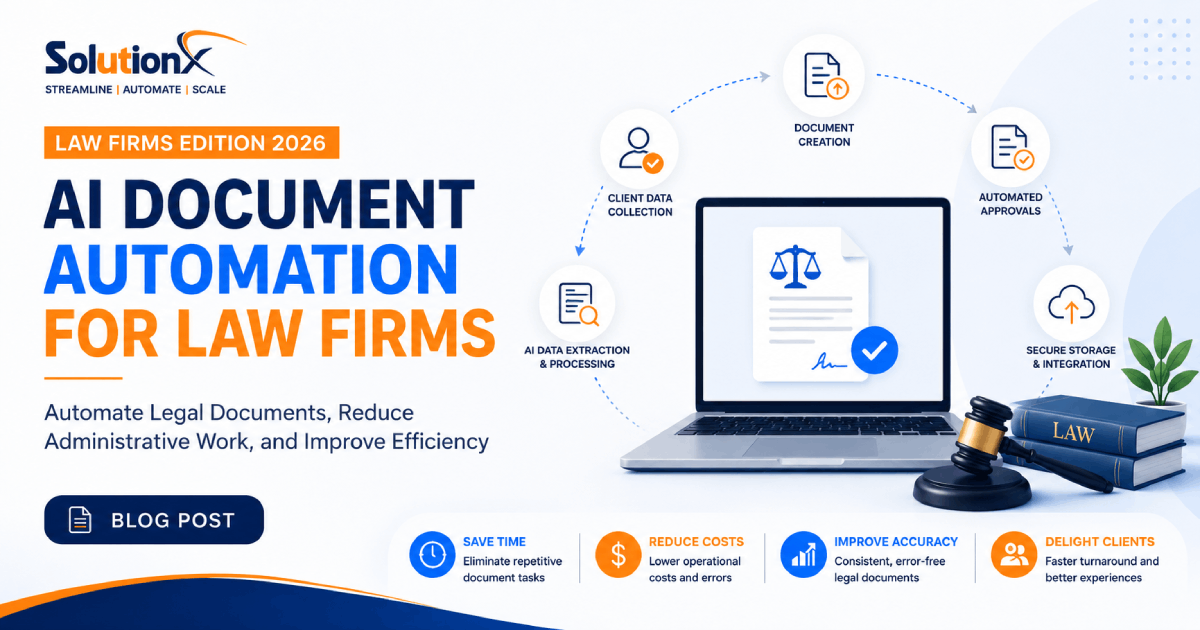
A typical document automation process follows these stages:
1. Client Information Collection
Information is collected through secure channels such as:
Online intake forms
Website enquiries
Client portals
CRM systems
Email submissions
Existing databases
The information is automatically validated before moving to the next stage.
2. Intelligent Data Extraction
If clients upload documents such as passports, contracts, financial statements, or court records, AI can automatically extract relevant information using Optical Character Recognition (OCR) and Intelligent Document Processing.
Instead of manually reading lengthy documents, the system identifies key information such as:
Names
Addresses
Dates
Reference numbers
Company information
Contract terms
Invoice details
Signatures
This information becomes immediately available for downstream workflows.
3. Automated Document Generation
Using approved legal templates, AI automatically populates:
Engagement letters
Retainer agreements
NDAs
Service agreements
Client questionnaires
Compliance forms
Internal documentation
The system inserts verified client information into predefined fields while maintaining the firm's formatting and legal standards.
4. Approval Workflows
Generated documents can be automatically routed to the appropriate solicitor, partner, or department for review before they are sent externally.
Approval rules can vary depending on:
Practice area
Matter value
Risk level
Client type
Responsible attorney
This ensures quality control without unnecessary administrative effort.
5. Secure Delivery and Storage
Once approved, documents can automatically:
Be emailed to clients
Be sent for electronic signature
Be uploaded to document management systems
Be linked to client matters
Trigger follow-up tasks
Update CRM records
Notify internal teams
Every action is recorded, providing improved visibility and auditability across the firm's operations.
Common Use Cases for Law Firms
AI document automation is not limited to a single workflow. It can improve operations across almost every practice area.
Some of the most common applications include:
Client Engagement Letters
Generate engagement letters automatically using client intake information while ensuring consistency across every new matter.
Non-Disclosure Agreements (NDAs)
Automatically prepare customized NDA templates using client information and predefined legal clauses.
Retainer Agreements
Reduce the time required to prepare retainer agreements while minimizing manual data entry.
Client Intake Documentation
Convert completed intake forms directly into structured legal documents without requiring staff to manually recreate information.
Compliance Documentation
Automate routine compliance forms and internal documentation required for regulatory and operational processes.
Contract Generation
Create standard legal agreements using approved templates while reducing drafting time for repetitive contracts.
Internal Legal Templates
Provide lawyers with AI-assisted access to approved templates, ensuring every document follows current firm standards.
Key Benefits of AI Document Automation for Law Firms
Firms that implement document automation often experience improvements across multiple areas of the business.
Reduce Administrative Work
By automating repetitive document-related tasks, staff spend less time on manual data entry and document preparation, allowing them to focus on client service and case support.
Improve Accuracy and Consistency
Using approved templates and automated data population helps reduce common errors while ensuring documents remain consistent across the firm.
Accelerate Client Onboarding
Automated document generation shortens the time between an initial enquiry and a signed engagement letter, creating a smoother onboarding experience.
Enhance Operational Efficiency
Automation reduces delays caused by manual approvals, document handling, and repetitive administrative processes, helping firms deliver services more efficiently.
Support Business Growth
As client volumes increase, AI document automation enables firms to manage more matters without proportionally increasing administrative workload, creating a more scalable operation.
AI Document Automation vs Traditional Manual Processes
Many law firms already use document templates, shared folders, or document management systems. While these tools help organize files, they still rely heavily on manual work.
AI document automation goes beyond document storage by automating the entire document lifecycle—from data collection and document generation to approvals, delivery, and record updates.
Manual Process | AI Document Automation |
|---|---|
Manual data entry | Automatically populates templates using verified client information |
Repetitive copy-and-paste | Eliminates duplicate data entry across systems |
Staff manually create documents | Documents generated instantly from approved templates |
Manual document routing | Automatic approval workflows based on predefined rules |
Separate file management | Documents are automatically organized and stored |
Higher risk of errors | Consistent documents using standardized templates |
Time-consuming follow-ups | Automated notifications, reminders, and status updates |
Rather than replacing legal professionals, AI supports them by removing repetitive administrative work so they can spend more time advising clients, managing cases, and delivering higher-value legal services.
Security and Compliance Considerations
Confidentiality is fundamental to legal practice. Any document automation solution should be designed with security, compliance, and governance in mind.
When evaluating an AI document automation platform, law firms should look for capabilities such as:
Role-based user permissions
Secure document storage
Encrypted data transmission
Audit trails and activity logging
Version control
Secure API integrations
Data retention policies
Compliance with applicable privacy and regulatory requirements
AI should complement a firm's existing security policies rather than bypass them. A well-designed solution helps improve visibility and control over document workflows while reducing the risks associated with manual processes.
Best Practices for Implementing AI Document Automation
Successful AI automation projects are not about automating everything at once. The most effective approach is to start with high-impact, repetitive workflows and expand gradually.
Identify Repetitive Document Processes
Begin by reviewing where your team spends the most administrative time.
Typical candidates include:
Engagement letters
Client intake forms
Standard agreements
Compliance documents
Routine correspondence
Internal approval workflows
These processes often provide the fastest return on investment.
Standardize Document Templates
Before introducing automation, ensure your firm has approved and up-to-date document templates.
Standardized templates improve consistency and make automation significantly more effective.
Connect Existing Systems
Document automation delivers greater value when integrated with existing business systems, such as:
Practice management software
CRM platforms
Document management systems
E-signature solutions
Accounting software
Client portals
Calendar and scheduling tools
This reduces duplicate work and creates seamless workflows across departments.
Keep Legal Professionals in Control
Automation should support legal teams—not replace professional judgment.
Documents involving complex legal advice or high-risk matters should still be reviewed by qualified legal professionals before being finalized or shared with clients.
Human oversight remains an essential part of any effective automation strategy.
Measure Results
Track key performance indicators after implementation, including:
Time spent preparing documents
Administrative hours saved
Error rates
Client onboarding time
Document turnaround time
Staff productivity
Client satisfaction
Measuring outcomes helps demonstrate the business value of automation and identify further opportunities for improvement.
Choosing the Right AI Document Automation Solution
Not all automation platforms are designed for the needs of professional service firms.
When selecting a solution, consider whether it can:
Generate documents using approved templates
Extract information from uploaded files
Integrate with existing legal software
Support approval workflows
Automate document routing
Scale as your firm grows
Maintain strong security and governance
Adapt to your firm's unique processes
The goal is not simply to automate documents but to create connected workflows that improve efficiency across the entire client lifecycle.
How Pro SolutionX Helps Law Firms Automate Document Workflows
At Pro SolutionX, we help law firms modernize their operations through intelligent AI automation and custom workflow solutions.
Rather than offering one-size-fits-all software, we design automation systems tailored to each firm's processes, technology stack, and operational goals.
Our solutions can include:
AI-powered document generation
Intelligent document processing (OCR)
Workflow automation
Internal AI assistants
AI knowledge bases
CRM automation
Client intake automation
Email and notification automation
API integrations
Custom legal workflow solutions
Every implementation is designed to reduce repetitive work, improve operational efficiency, and help legal professionals focus on delivering exceptional client service.
Conclusion
Legal professionals generate and manage an enormous volume of documents every day. While these documents are essential to serving clients, the manual processes surrounding them often consume valuable time and resources.
AI document automation enables law firms to streamline document creation, improve consistency, reduce administrative work, and build more efficient workflows without compromising quality or compliance.
By automating repetitive document-related tasks, firms can improve client experiences, support business growth, and allow legal professionals to spend more time on strategic, billable work.
As the legal industry continues to embrace digital transformation, firms that invest in intelligent document automation today will be better positioned to improve productivity, scale efficiently, and remain competitive in the years ahead.
Frequently Asked Questions
What is AI document automation for law firms?
AI document automation uses artificial intelligence to create, process, organize, and manage legal documents automatically, reducing manual administrative work while improving consistency and efficiency.
Can AI generate legal documents?
AI can generate standard legal documents using approved templates and structured client information. However, documents requiring legal judgment should always be reviewed by qualified legal professionals.
Is AI document automation secure?
Modern automation platforms include security features such as encryption, access controls, audit logs, and secure integrations. Firms should ensure any solution aligns with their security and regulatory requirements.
What types of legal documents can be automated?
Common examples include:
Engagement letters
Retainer agreements
Non-disclosure agreements (NDAs)
Client intake forms
Compliance documents
Standard contracts
Internal legal templates
Routine correspondence
Will AI replace lawyers?
No. AI is designed to automate repetitive administrative tasks, not replace legal expertise. Lawyers remain responsible for legal advice, strategic decision-making, and client representation.
How long does it take to implement AI document automation?
Implementation timelines depend on the complexity of workflows, existing systems, and integration requirements. Many firms begin with a single workflow before expanding automation across additional processes.
Can AI document automation integrate with existing legal software?
Yes. Many AI automation solutions can integrate with CRM systems, document management platforms, practice management software, e-signature tools, and other business applications through APIs and workflow automation.
What are the biggest benefits of AI document automation?
The primary benefits include:
Reduced administrative workload
Faster document generation
Improved accuracy
Better client experience
Increased operational efficiency
Greater scalability
Consistent document quality
Ready to Modernize Your Law Firm's Document Workflows?
Manual document processes shouldn't limit your firm's growth.
Whether you're looking to automate engagement letters, streamline client intake, integrate document workflows with your existing systems, or build an AI-powered legal operations platform, Pro SolutionX can help.
Book a Free AI Audit to discover how intelligent document automation can reduce repetitive work, improve operational efficiency, and create a more scalable legal practice.

Pro SolutionX
Technology & Growth Team
Pro SolutionX is a team of software engineers, AI specialists, automation consultants, and digital growth experts dedicated to helping businesses scale through technology, custom software, AI automation, cloud infrastructure, and data-driven digital strategies.