AI Document Processing for Accounting Firms: Complete 2026 Guide
Accounting firms process a constant stream of documents: invoices, receipts, bank statements, tax forms, payroll records, expense reports, engagement letters, and client onboarding files.
The problem is not the documents themselves. The problem is the amount of repetitive work required to collect, classify, extract, validate, rename, store, and route the information they contain.
For many accounting firms, skilled professionals still spend valuable time downloading attachments, copying figures between systems, chasing missing documents, checking file names, and manually entering data into accounting software.
AI document processing can change this workflow.
By combining Optical Character Recognition (OCR), artificial intelligence, workflow automation, and system integrations, accounting firms can turn unstructured documents into structured, usable data and automatically move that data through business processes.
This guide explains how AI document processing works, where accounting firms can use it, how it differs from traditional OCR, and how to approach implementation without creating unnecessary complexity.
What Is AI Document Processing?
AI document processing is the use of artificial intelligence and automation technologies to capture, understand, extract, validate, and route information from documents.
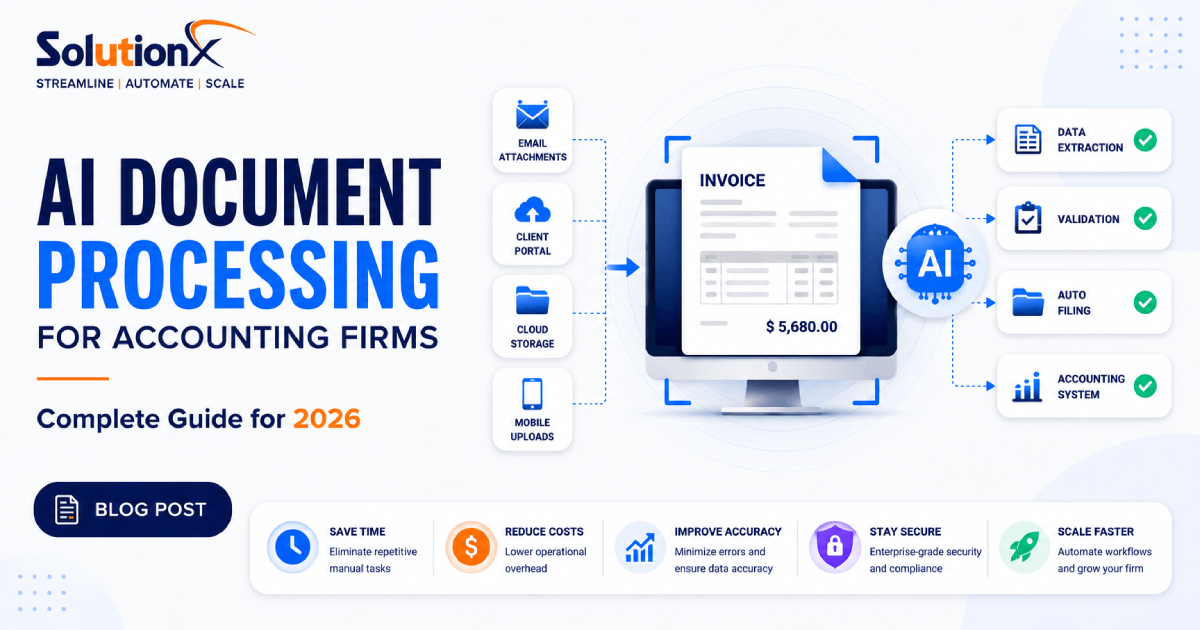
A typical system can process documents received through channels such as:
Email attachments
Client portals
Cloud storage folders
Web forms
Mobile uploads
Scanned documents
Internal systems
Third-party APIs
Instead of requiring a team member to manually review every document, the system can identify the document type, extract relevant information, apply validation rules, and send the data or document to the appropriate destination.
For example, an invoice processing workflow could:
Detect a new invoice received by email.
Download the attachment automatically.
Identify it as an invoice.
Extract the supplier name, invoice number, date, line items, tax, and total amount.
Validate the extracted information against predefined rules.
Check for possible duplicates.
Route exceptions to a team member for review.
Send approved data to the relevant accounting or business system.
Store the original document in the correct folder or document management system.
Record workflow activity for audit and reporting purposes.
The objective is not simply to read a PDF. It is to automate the business process surrounding the document.
Why Document Processing Becomes a Bottleneck for Accounting Firms
Accounting work depends on accurate and timely information.
However, the information required by an accounting firm often arrives in inconsistent formats and through multiple communication channels.
One client may upload documents to a portal. Another may send email attachments. Another may share files through cloud storage. Some documents may be digitally generated PDFs, while others may be scanned images or photographs.
This creates several operational problems.
Manual Data Entry
Employees may need to read information from one document and enter it into another system.
Even when each task takes only a few minutes, the total workload becomes significant when repeated across hundreds or thousands of documents.
Manual entry also creates opportunities for:
Typing errors
Incorrect dates
Duplicate entries
Missing fields
Incorrect categorisation
Inconsistent naming conventions
Document Chasing
Teams frequently spend time determining which documents have been received and which are still missing.
This creates unnecessary communication between clients and staff and can delay downstream work.
Inconsistent Filing
Documents may be stored under different names, in different folders, or across multiple systems.
This makes retrieval slower and creates additional administrative work.
Repetitive Validation
Even after data has been extracted, someone may need to check whether:
Required fields are present
Totals are consistent
A document is a duplicate
The date is within the expected period
The client or supplier exists in the system
The document has been assigned to the correct workflow
These checks are often rule-based, making them strong candidates for automation.
Limited Operational Visibility
When document workflows depend on email inboxes, spreadsheets, and manual follow-ups, management has limited visibility into questions such as:
How many documents are waiting for processing?
Which clients have missing documents?
Where are workflow bottlenecks occurring?
How many exceptions require manual review?
How long does processing take?
A well-designed document automation system can provide much clearer operational visibility.
AI Document Processing vs Traditional OCR
OCR and AI document processing are related, but they are not the same thing.
Traditional OCR converts text inside an image or scanned document into machine-readable text.
For example, OCR may recognise an invoice number as text. However, recognising text is only one part of the workflow.
An AI document processing system can go further by determining:
What type of document it is
Which text represents the invoice number
Which value is the invoice date
Which company issued the invoice
What the subtotal and tax amounts are
Whether the document appears to be a duplicate
Whether extracted information passes validation
Which workflow should receive the document
The practical difference is important.
Traditional OCR focuses on reading text.
AI document processing focuses on understanding documents and automating the business workflows around them.
For accounting firms, the second approach usually creates greater operational value because the goal is not merely to digitise documents. The goal is to reduce repetitive work throughout the complete document lifecycle.
Documents Accounting Firms Can Process Automatically
The best automation opportunities depend on the firm's services, client base, software stack, and internal processes.
However, several document categories are particularly suitable for intelligent processing.
1. Invoices
AI can extract information such as:
Supplier name
Invoice number
Invoice date
Due date
Purchase order reference
Line items
Subtotal
Tax
Currency
Total amount
The extracted information can then be validated and sent to the appropriate accounting, approval, or document management workflow.
2. Receipts
Receipt processing can extract:
Merchant name
Transaction date
Total amount
Tax amount
Payment method
Expense category
Low-confidence or ambiguous documents can be sent to a human reviewer instead of being processed automatically.
3. Bank Statements
Bank statement processing can help extract and structure:
Transaction dates
Descriptions
Debit amounts
Credit amounts
Balances
Account references
The system can then prepare the information for reconciliation or downstream review.
4. Tax Documents
Tax-related workflows often involve high document volumes and strict deadlines.
AI document processing can assist with:
Document classification
Data extraction
Completeness checks
Client matching
File naming
Folder organisation
Missing-document identification
Workflow routing
Final tax and compliance decisions should remain within the firm's professional review process.
5. Payroll Documents
Depending on the workflow and regulatory requirements, document automation can help organise and extract data from:
Timesheets
Payroll summaries
Employee forms
Expense claims
Payroll reports
Automation is particularly valuable when the process currently involves repeatedly moving information between emails, spreadsheets, and business systems.
6. Client Onboarding Documents
New client onboarding may require a combination of:
Identity documents
Business registration information
Tax information
Previous financial records
Engagement documents
Completed questionnaires
An automated workflow can classify uploads, check whether required documents have been received, update the onboarding status, and notify the appropriate team member when action is required.
The exact workflow should be designed around applicable privacy, security, and compliance obligations.
How AI Document Processing Works
A production-ready document automation workflow usually includes several connected stages.
Understanding these stages helps firms avoid a common mistake: buying an isolated AI tool without redesigning the surrounding workflow.
Stage 1: Document Capture
The system first needs a reliable method for receiving documents.
Possible sources include:
Shared inboxes
Dedicated email addresses
Secure client portals
Cloud storage
CRM systems
Web forms
Mobile applications
API integrations
The goal is to create predictable entry points for documents.
Stage 2: Classification
The system identifies the type of document.
For example:
Invoice
Receipt
Bank statement
Tax document
Payroll record
Client onboarding document
Classification determines which extraction model, validation rules, and downstream workflow should be used.
Stage 3: Data Extraction
The system extracts relevant fields from the document.
The required fields should be defined by the business process rather than by what the technology can theoretically extract.
For example, if an invoice workflow only needs the supplier, invoice number, date, tax, and total, extracting dozens of unnecessary fields creates additional complexity without improving the business outcome.
Stage 4: Validation
Extracted information should be checked against business rules.
Validation can include:
Required field checks
Date validation
Total calculations
Duplicate detection
Client matching
Supplier matching
Format validation
Confidence thresholds
Documents that fail validation can be routed to an exception queue.
Stage 5: Human Review
Not every document should be processed without human oversight.
A strong system uses human review strategically.
High-confidence documents that pass validation may continue automatically, while ambiguous documents are sent to the appropriate employee for review.
This approach allows firms to automate repetitive work without removing professional oversight from important decisions.
Stage 6: System Integration
Validated data must reach the systems where employees actually work.
Depending on the firm's technology stack, this may involve integration with:
Accounting platforms
Practice management software
CRM systems
Document management platforms
Cloud storage
Internal databases
Reporting systems
Custom software
This is where API integration becomes critical.
Without integration, a document AI tool may extract information successfully but still require staff to copy the results manually into another platform.
That significantly reduces the value of the automation.
Stage 7: Monitoring and Reporting
The workflow should record operational information such as:
Documents received
Documents processed
Exceptions generated
Validation failures
Processing times
Workflow status
Integration failures
This creates visibility for operational management and continuous improvement.
7 AI Document Processing Use Cases for Accounting Firms
The following use cases show how document AI can be applied to practical accounting workflows.
1. Automated Invoice Intake
The Business Problem
Invoices arrive through email, uploads, and shared folders. Staff manually download, rename, review, and enter information into other systems.
The AI Solution
An automated workflow monitors approved intake channels, identifies invoices, extracts required fields, applies validation rules, and routes the information to the correct workflow.
Business Outcome
The firm can reduce repetitive administrative work, standardise invoice handling, and give staff more time for review and higher-value client work.
2. Receipt Processing and Expense Categorisation
The Business Problem
Receipts arrive in inconsistent formats and may require manual review before being entered or categorised.
The AI Solution
AI extracts merchant information, dates, totals, and tax values. Business rules or classification models can suggest categories, while uncertain cases are routed for review.
Business Outcome
The workflow becomes faster and more consistent while maintaining human control over exceptions and ambiguous transactions.
3. Automated Client Document Collection
The Business Problem
Staff repeatedly contact clients to request missing files and manually track document status.
The AI Solution
A workflow tracks required documents, recognises uploaded files, updates the client's document checklist, and triggers reminders when specific items remain outstanding.
Business Outcome
The firm can reduce administrative follow-up and gain better visibility into client readiness.
4. Tax Document Classification
The Business Problem
During busy periods, teams receive large volumes of mixed documents that must be identified, renamed, and filed correctly.
The AI Solution
AI classifies incoming documents, applies standard naming conventions, links them to the correct client or workflow, and flags uncertain classifications for review.
Business Outcome
Teams spend less time organising files and can move documents into the correct review process more efficiently.
5. Bank Statement Data Extraction
The Business Problem
Transaction data may need to be manually prepared from statements before reconciliation or analysis.
The AI Solution
The system extracts structured transaction information and applies validation checks before sending the data to the next stage.
Business Outcome
The firm reduces preparation work and creates a more standardised input process for reconciliation workflows.
6. Automated Document Filing
The Business Problem
Documents are stored inconsistently across folders, inboxes, and platforms.
The AI Solution
The system classifies each document, applies a standard naming convention, and stores it in the correct client folder or document management location.
Business Outcome
Document retrieval becomes easier, filing becomes more consistent, and teams spend less time searching for information.
7. Exception Detection and Routing
The Business Problem
Employees spend time manually reviewing every document, even when most follow predictable patterns.
The AI Solution
Automation handles standard documents and routes only unusual, incomplete, or low-confidence cases to the appropriate person.
Business Outcome
Human attention is concentrated where professional judgement is actually required.
Example: An Automated Client Document Workflow
Consider an accounting firm that receives monthly bookkeeping documents from clients.
A traditional process might look like this:
The client emails documents.
An employee downloads the attachments.
The employee checks the client name.
Files are manually renamed.
Documents are placed into folders.
Invoice and receipt information is entered into another system.
Missing documents are identified manually.
The employee contacts the client.
The process is repeated for every client.
An automated version could work differently.
Step 1: Document Submission
The client submits documents through an approved email address, portal, or upload form.
Step 2: Automatic Identification
The system identifies the client and classifies each uploaded document.
Step 3: Data Extraction
Relevant information is extracted based on the document type.
Step 4: Validation
The system checks required fields, possible duplicates, expected date ranges, and other business rules.
Step 5: Exception Handling
Documents with missing information or low-confidence extraction are sent to a review queue.
Step 6: Storage and Integration
Approved documents are renamed, stored, and synchronised with relevant business systems.
Step 7: Missing Document Detection
The workflow compares received files against the client's requirements.
Step 8: Automated Follow-Up
If required documents are missing, the workflow can trigger an appropriate reminder or internal task.
Step 9: Operational Reporting
The firm can monitor which clients are ready for processing, which documents require review, and where bottlenecks exist.
The important point is that the value comes from the complete workflow, not from AI extraction alone.
Business Benefits of AI Document Processing
The ROI of document automation should be evaluated against measurable operational outcomes.
Reduced Administrative Work
Automation can handle repetitive tasks such as:
Downloading files
Renaming documents
Classifying document types
Extracting standard fields
Checking required information
Routing files
Updating workflow status
This allows skilled employees to focus more time on work requiring judgement, communication, analysis, and advisory expertise.
Faster Processing
Documents can move through automated stages as soon as they arrive rather than waiting for someone to manually begin the process.
This can reduce workflow delays and improve turnaround time.
More Consistent Processes
Automation applies the same defined workflow rules to each document.
This can improve consistency in:
File naming
Document classification
Validation
Routing
Status updates
Record keeping
Better Scalability
A manual process usually requires additional administrative capacity as document volume increases.
Automation can help firms process greater volumes without increasing repetitive work at the same rate.
Improved Operational Visibility
A structured workflow can make it easier to understand:
Current workload
Pending documents
Client readiness
Exception volumes
Processing bottlenecks
Workflow failures
This information helps management improve processes based on actual operational data.
Improved Client Experience
Clients benefit when the firm can:
Confirm document receipt quickly
Identify missing documents earlier
Reduce repetitive follow-ups
Provide clearer status updates
Process information more consistently
Automation should make the client experience simpler, not add unnecessary complexity.
How to Think About ROI
AI document processing should not be justified by vague claims about innovation.
The business case should be based on the current process.
A firm can begin by measuring:
Number of documents processed per month
Average manual handling time per document
Number of employees involved
Cost of administrative processing
Time spent correcting errors
Time spent chasing missing documents
Delays caused by incomplete information
Current exception rate
A simplified framework is:
Current Process Cost = Document Volume × Average Handling Time × Labour Cost
Then compare the current process against the expected future state, including:
Automation costs
Integration costs
Human review requirements
Maintenance requirements
Expected time savings
Expected reduction in repetitive processing
Not every workflow needs AI.
If a process is low-volume, highly variable, or cheaper to handle manually, automation may not provide sufficient value.
The strongest opportunities usually involve workflows that are:
High-volume
Repetitive
Rule-driven
Time-consuming
Dependent on structured information
Connected to multiple systems
Security, Privacy, and Human Review
Accounting firms handle sensitive business and financial information.
Document automation therefore needs to be designed with security and governance in mind from the beginning.
Important considerations include:
Data access controls
Encryption
Authentication
Audit logging
Data retention policies
Vendor security practices
Data processing locations
Role-based permissions
Backup and recovery procedures
Applicable regulatory obligations
The exact requirements will depend on the firm's location, client base, services, and technology environment.
Human-in-the-Loop Review
AI confidence should not be treated as certainty.
A practical workflow can define thresholds and validation rules.
For example:
High-confidence extraction plus successful validation → Continue automatically
Medium-confidence extraction → Request human review
Missing required fields → Send to exception queue
Validation failure → Stop workflow and request review
This approach combines automation efficiency with professional oversight.
How to Implement AI Document Processing
Successful implementation begins with process analysis, not software selection.
Step 1: Map the Existing Workflow
Document the current process from beginning to end.
Identify:
Where documents arrive
Who handles them
What information is extracted
Which rules are applied
Where data is entered
Which systems are involved
Where delays occur
Which tasks are repetitive
Which decisions require professional judgement
Without this process map, firms risk automating individual tasks without improving the overall workflow.
Step 2: Select a High-Value Starting Workflow
Do not attempt to automate every document process at once.
Start with a workflow that has:
Meaningful document volume
Clear business rules
Repetitive manual steps
Measurable processing costs
Defined inputs and outputs
A focused implementation is easier to test, measure, and improve.
Step 3: Define Success Metrics
Before implementation, define how success will be measured.
Possible metrics include:
Processing time per document
Manual touches per document
Exception rate
Average turnaround time
Time spent on document chasing
Number of documents processed
Percentage of documents requiring human review
Metrics create a clear connection between the automation and business value.
Step 4: Design the Exception Process
Teams often focus on the ideal workflow and ignore exceptions.
In practice, exceptions are one of the most important parts of the system.
Define what should happen when:
A document cannot be classified
Required data is missing
Extraction confidence is low
A duplicate is detected
A system integration fails
A document does not match the expected client
Validation rules fail
A reliable exception workflow is essential for production use.
Step 5: Integrate Existing Systems
Automation should work with the firm's existing technology environment wherever practical.
The objective is to reduce fragmented work, not create another isolated platform that employees must manage.
Integration may involve:
APIs
Webhooks
Workflow automation platforms
Secure file transfers
Database integrations
Custom middleware
The correct architecture depends on workflow complexity, transaction volume, security requirements, and the capabilities of existing systems.
Step 6: Test With Realistic Documents
Document workflows should be tested against representative examples.
Testing should include:
Different document layouts
Low-quality scans
Missing fields
Unexpected formats
Duplicate files
Incorrect uploads
Multi-page documents
Integration failures
The goal is to understand how the workflow behaves outside the ideal scenario.
Step 7: Monitor and Improve
Document automation is not a one-time configuration exercise.
Teams should review:
Common exception reasons
Validation failures
Integration errors
Processing times
User feedback
New document formats
Workflow bottlenecks
The workflow can then be improved based on operational evidence.
Build, Buy, or Create a Custom Automation Workflow?
Accounting firms generally have three approaches to document automation.
Option 1: Use an Existing Software Product
This can work well when the firm's process closely matches the software's standard workflow.
Best for:
Standard processes
Common document types
Limited integration requirements
Firms that can adapt their workflow to the product
Potential limitation: The firm may need to change its processes to fit the software, and integration flexibility may be limited.
Option 2: Connect Existing Tools With Workflow Automation
In this approach, existing systems are connected using APIs, webhooks, and automation platforms.
Best for:
Multi-system workflows
Moderate customisation requirements
Firms already using capable business platforms
Processes that need orchestration rather than complete replacement
This approach can often create significant value without requiring a completely new software platform.
Option 3: Build a Custom Document Processing System
A custom system may be appropriate when the firm has unique workflows, complex integration requirements, or needs greater control over the user experience and business logic.
Best for:
Proprietary workflows
Complex document pipelines
High-value operational processes
Advanced integration requirements
Custom approval systems
Internal platforms
The strongest option depends on the business case.
Custom development should not be the default recommendation when a simpler solution can achieve the required outcome.
Common Mistakes to Avoid
AI document processing projects can underperform when implementation focuses on technology rather than operations.
Automating a Broken Process
If the existing workflow contains unnecessary approvals, duplicate data entry, or unclear ownership, adding AI may automate inefficiency rather than remove it.
Improve the process design first.
Ignoring Exceptions
A workflow that works only with perfect documents is not production-ready.
Exception handling should be designed from the beginning.
Using AI Where Simple Rules Are Better
Not every decision requires an AI model.
If a reliable rule can solve the problem, a rule-based approach may be simpler, more predictable, and easier to maintain.
The best automation architecture often combines:
Deterministic business rules
AI models
OCR
APIs
Human review
Creating Another Data Silo
A standalone AI tool may create additional work if employees still need to manually move its output into other systems.
Integration should be part of the implementation strategy.
Measuring Activity Instead of Business Outcomes
The number of documents processed by AI is not enough to prove value.
Measure outcomes such as:
Time saved
Manual steps removed
Turnaround time improved
Exceptions reduced
Administrative workload reduced
Capacity increased
A Practical Automation Roadmap for Accounting Firms
For firms considering AI document processing, a practical roadmap can be divided into four phases.
Phase 1: Discovery
Map document workflows
Identify repetitive tasks
Estimate processing costs
Review existing software
Identify integration opportunities
Prioritise use cases
Phase 2: Pilot
Select one high-value workflow
Define success metrics
Build the minimum required integration
Test with representative documents
Create an exception process
Gather team feedback
Phase 3: Production Deployment
Strengthen security controls
Add monitoring and logging
Improve error handling
Train relevant employees
Document the process
Establish ownership
Phase 4: Expansion
Once the initial workflow is stable and producing measurable value, the firm can evaluate adjacent processes.
For example:
Invoice Processing → Receipt Processing → Client Document Collection → Automated Filing → Workflow Reporting
This phased approach reduces implementation risk and creates opportunities to validate business value before expanding.
How Pro SolutionX Helps Accounting Firms Automate Document Workflows
At Pro SolutionX, we help businesses eliminate repetitive work and improve operational efficiency through AI automation, intelligent workflows, custom software, and system integrations.
For accounting and bookkeeping firms, document automation solutions can include:
AI document classification
Intelligent data extraction
Invoice and receipt processing workflows
Client document intake automation
Automated file organisation
Missing-document workflows
Human review queues
API integrations
CRM automation
Internal AI assistants
Custom operations dashboards
Workflow monitoring and reporting
Our approach starts with the business process.
We first identify the operational bottleneck, understand the systems involved, and evaluate whether automation can create measurable value.
The objective is not to add AI for the sake of AI.
The objective is to build a reliable workflow that reduces repetitive work, improves operational visibility, and helps the business scale more efficiently.
Frequently Asked Questions
What is AI document processing for accounting firms?
AI document processing uses technologies such as artificial intelligence, OCR, workflow automation, and system integrations to classify documents, extract relevant information, validate data, and route documents through accounting workflows.
Can AI process invoices and receipts automatically?
AI systems can extract information from invoices and receipts, including supplier names, dates, invoice numbers, totals, and tax information. The extracted data can then be validated and integrated with downstream systems. Low-confidence or unusual documents can be routed for human review.
Is AI document processing the same as OCR?
No. OCR primarily converts text from images or scanned documents into machine-readable text. AI document processing goes further by classifying documents, identifying relevant fields, applying validation rules, and connecting the extracted information to business workflows.
Can AI document processing integrate with existing accounting software?
In many cases, yes. Integration options depend on the capabilities of the accounting software and other systems involved. Common integration methods include APIs, webhooks, workflow automation platforms, and custom middleware.
Should every document workflow be automated?
No. Automation is most valuable when a process is repetitive, sufficiently high-volume, rule-driven, and measurable. Low-volume or highly variable workflows may not justify the implementation and maintenance cost.
How should accounting firms handle AI extraction errors?
A reliable system should use validation rules, confidence thresholds, exception queues, and human review. The objective is not to assume every AI output is correct, but to design a workflow that knows when automated processing should stop and human review should begin.
How can an accounting firm start with document automation?
Start by mapping one existing document workflow. Measure the current processing time, manual steps, exception types, and systems involved. Then select a focused use case with clear business value and test it through a controlled pilot before expanding to additional workflows.
Final Thoughts
AI document processing can create significant operational value for accounting firms, but only when it is implemented as part of a well-designed business workflow.
Extracting information from a document is only one step.
The greater opportunity is connecting document intake, classification, extraction, validation, human review, system integration, storage, and reporting into one reliable process.
For accounting firms, the most effective approach is usually to start with a specific bottleneck, measure the current cost of the process, automate the repetitive stages, and maintain human oversight where professional judgement is required.
The result is not simply faster document processing.
It is a more scalable operating model in which skilled employees spend less time moving information between systems and more time delivering work that creates value for clients.
If your accounting or bookkeeping firm is spending too much time collecting, processing, checking, and organising documents, Pro SolutionX can help you identify the strongest automation opportunities and design a practical implementation roadmap.
Start with an automation assessment to identify where AI document processing and workflow automation can create measurable value in your firm.

Pro SolutionX
Technology & Growth Team
Pro SolutionX is a team of software engineers, AI specialists, automation consultants, and digital growth experts dedicated to helping businesses scale through technology, custom software, AI automation, cloud infrastructure, and data-driven digital strategies.